Why we stopped asking for a username
BlogProduct
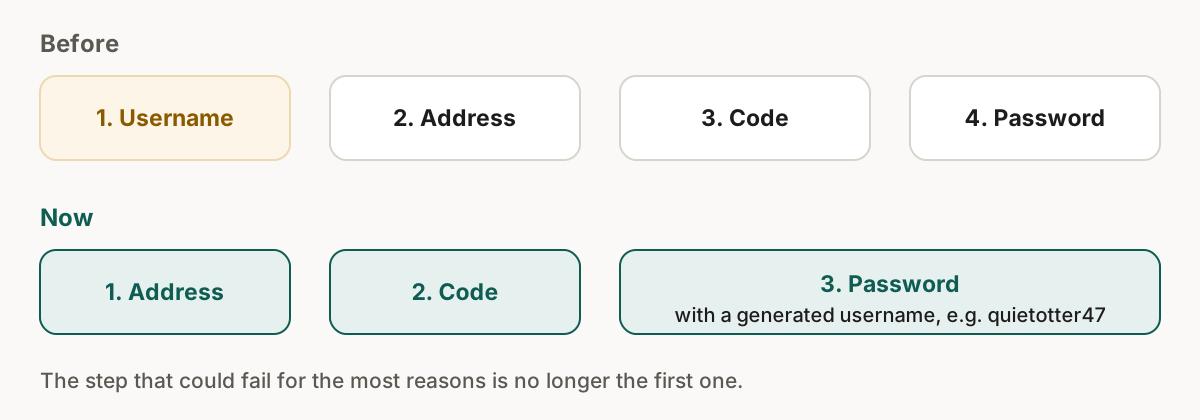
Until this week, the first thing Skudo asked a new person for was a username: no email, no password, a username on a screen with nothing else. It was the worst first step.
In short
- The username was the step with the most ways to fail, and it came first.
- It existed for a feature few people use: addresses on your own subdomain.
- Signup is now address, code, password, with a generated username you can change.
- The password stays because it also protects the key that encrypts your forwarded mail.
The step with the most ways to fail
| Item | Username | Email address |
|---|---|---|
| Can be taken | Yes | No |
| Can be too short or contain a forbidden character | Yes | Rarely |
| Can be reserved | Yes | No |
| Typed correctly the first time | Often not | Almost always |
Each rejection arrives before the person has any reason to stay.
What it looks like now
Skudo generates a readable username, like quietotter47. It sits on the last step with a shuffle button and a button to write your own. The username only matters for addresses like anything@yourname.skudo.org, which most people never use.
Why the password stays
Passkeys are better in almost every way, and our login screen already puts them first. But the password also protects the private key that encrypts your forwarded mail, through a key derivation that runs in your browser. Without it, that key has nothing to protect it.
We changed what we ask around it: one field, a reveal button, no confirmation field.
How the advice works
The guidance follows NIST SP 800-63B revision 4, finalised in July 2025.[2] It says verifiers "SHALL NOT impose other composition rules (e.g., requiring mixtures of different character types) for passwords".[1]
| Old rule | Current guidance |
|---|---|
| One capital, one number, one symbol | No composition rules |
| Short minimum | At least 15 characters as the only factor, 8 as one of several |
| No check against known passwords | Check against a blocklist of compromised ones |
So we look at what you typed. If it is a keyboard walk, a year, or the Word123! shape, we say so in those words.
Say what is wrong
"Your password is weak" is not advice. "It contains qwerty" is.
Sources
All checked on 20 September 2026.
- NIST, SP 800-63B-4, Digital Identity Guidelines, Authentication and Authenticator Management: https://pages.nist.gov/800-63-4/sp800-63b.html ↑
- NIST Computer Security Resource Center, SP 800-63B-4 (final, published in 2025): https://csrc.nist.gov/pubs/sp/800/63/b/4/final ↑