How to move an existing account to an email alias
BlogGuide
You do not have to start over. Most services let you change the email address on an account you already have, so you can move your old accounts to aliases one at a time, starting with the ones that matter least.
In short
- Move accounts as you use them. Nobody needs to change forty accounts in one afternoon.
- Start with shops, newsletters and forums. Leave your bank and your main mailbox for last.
- Create one alias per account, change the address in the account settings, then confirm the new address.
- Keep the old address working until every account has moved, because it is how you recover a password.
Why people give up
An account you made years ago already holds your real address. The job looks endless, so most people skip it, and the address stays in every database that ever received it.
The fix is not a weekend of work. Each time you log in to an old account, spend two minutes changing its address. Within a few months the accounts you actually use have moved, and the rest can wait.
In what order
| Move first | Move later | Move last |
|---|---|---|
| Shops you still order from | Social networks | Your bank and tax accounts |
| Newsletters and forums | Cloud storage and photos | The mailbox you forward to |
| Apps you use rarely | Work and school services | Anything used to prove who you are |
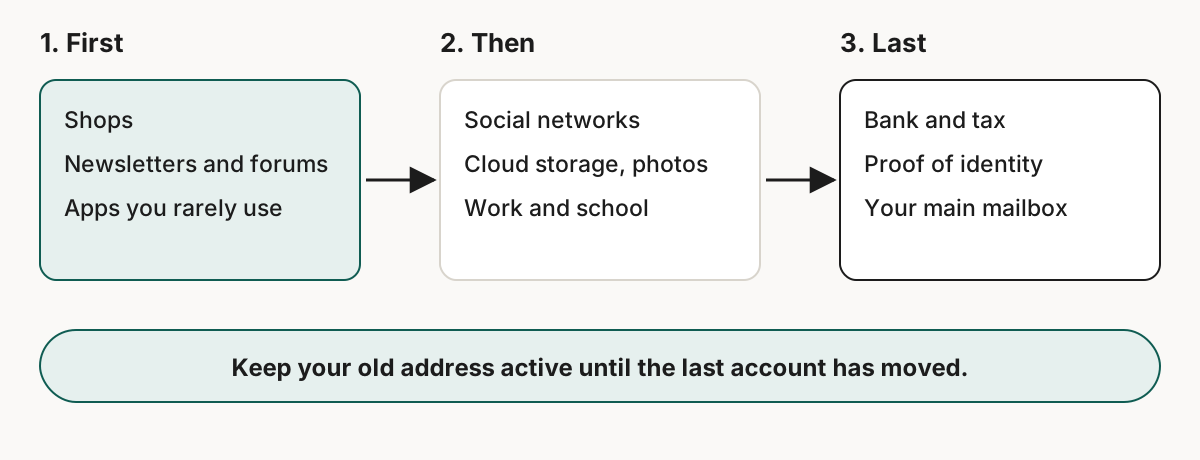
Start where a leak costs least. A shop breach exposes an address you have just made for that shop, as described in what happens to your address when a shop is breached.
Move one account
- Create the alias. Make it in Skudo, and name it after the service so you know where it belongs.
- Open the account settings. Look for Email, Profile or Security, and choose the option to change the address.
- Enter the alias. The service usually sends a confirmation message to the new address, and sometimes to the old one as well.
- Confirm it. The message reaches your inbox through the alias. Click the link, and the change is done.
- Check the alias. Send yourself a password reset and make sure it arrives.
Some services do not let you edit the address. In that case look for a way to contact support, or create a new account with the alias and delete the old one if the service allows it.
What to keep
Do not close the old address yet
Password resets and security warnings from accounts you have not moved still go to your old address. Keep it working until the last account has changed.
Keep the alias alive for as long as the account exists. If you switch an alias off, the service can no longer reach you, and you may not be able to reset the password.
After the move
Once an account uses its own alias, mail sent to that alias tells you who has your address. If a stranger writes to it, that service shared it or lost it, and you switch off only that alias.
A service that has already leaked your old address will keep sending to it. Moving the account stops new mail on that address, not the copies that already exist. To see where your old address has appeared, search it on Have I Been Pwned.[1]
Reading next: email aliases for online shopping and how to reply from an email alias.
Sources
- Have I Been Pwned, Frequently Asked Questions. https://haveibeenpwned.com/FAQs. Checked on 21 September 2026. ↑