What is an email tracking pixel? What senders learn
BlogExplainer
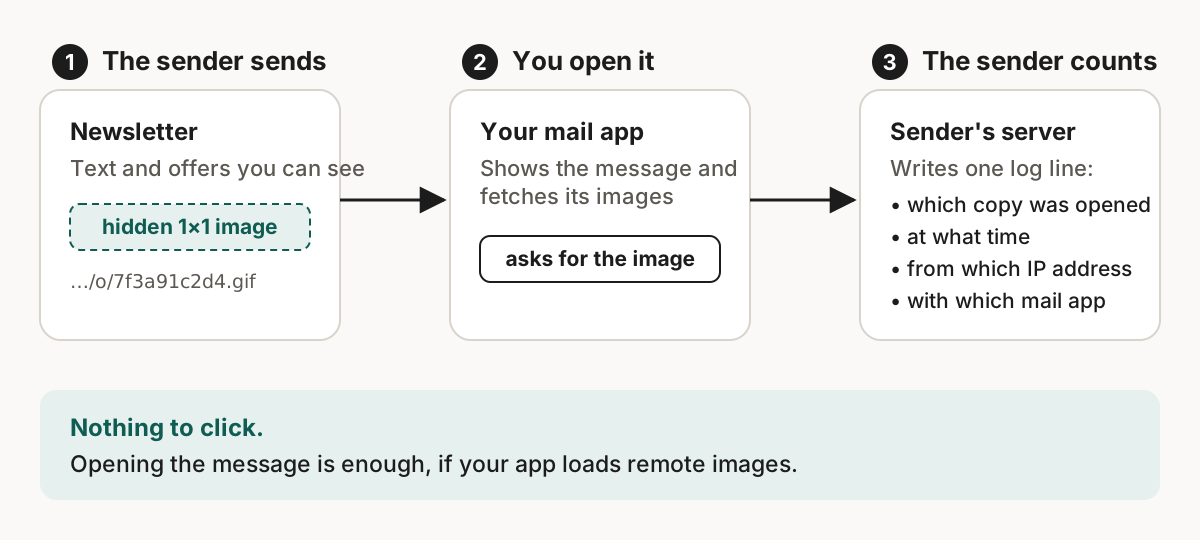
Marketing email can tell the sender that you opened it, when, and roughly where you were. It uses a hidden one-pixel image called a tracking pixel.
In short
- A tracking pixel is a hidden image. When your mail app loads it, the sender's server records the open.[1]
- The sender sees the time, how often you open the message, your IP address and your mail app.[6]
- An alias hides your address, not this. Blocking the pixel is a separate step.
- Skudo removes the common trackers and lists what it leaves alone.
How it works
Marketing email is HTML, and HTML can load images from someone else's server. A tracking pixel is one of them. In the message source it looks like this:
<img src="https://mail.example-mailer.com/o/7f3a91c2d4.gif" width="1" height="1" alt="">
The image is transparent, so you never see it. The part after /o/ identifies your copy of the message. Mailchimp says its version "loads a tiny, transparent image into each email".[1]
What the sender sees
| The sender can see | How |
|---|---|
| That the message was opened, and when | The image request arrives at their server |
| How many times it was opened | Each load is one more request |
| Roughly where you are | The IP address of whoever made the request |
| Which mail app you use | The user agent sent with any web request |
Apple's privacy page lists the same things: when and how many times you opened the message, and your IP address and location.[6] The sender does not get your real address from this.
Links tell the rest
A link in the message can add tracking too:
https://shop.example/summer-sale?utm_source=newsletter&utm_campaign=summer-sale&fbclid=IwAR0abc123
| Parameter | Where it comes from | What it says |
|---|---|---|
utm_source, utm_medium, utm_campaign | Google Analytics convention[2] | Where the visit came from |
fbclid | Generated by Meta[3] | Which ad click it belongs to |
If a link also carries an identifier unique to you, the sender knows you opened the message and looked at the product.
What Skudo removes
| Skudo removes | Skudo leaves alone |
|---|---|
| Remote images of 3 pixels or smaller | Large remote images |
Images from known tracking domains, or with paths like /open or /pixel.gif | Unsubscribe links |
Link parameters like utm_*, fbclid, gclid, msclkid | Redirect links |
It is on by default and runs before your mail app sees the message. Messages that arrive already end-to-end encrypted are left as they are. addy.io lists "Block Tracking Pixels" on its Lite and Pro plans and not on Free.[8]
Removal reduces tracking, it does not end it
A sender can still use a large image with a unique address, and Skudo will pass it through. It takes the cautious side because it would rather leave a tracker in than break a message.
In your own mail app
- Do not load remote images by default. In Gmail this is "Ask before displaying external images". Even then, "sometimes, senders may know whether you've opened an email that has an image".[4] Gmail loads images through Google's proxy servers, so the sender sees Google's request, not yours.[5]
- Turn on Apple's Protect Mail Activity. Apple says "your IP address is hidden from senders and remote content is privately downloaded in the background when you receive a message (instead of when you view it)".[7]
- Strip trackers before they arrive. That is what a forwarding service can do, and it complements the two steps above.
What this does not change
Blocking a pixel does not remove you from a sender's list. The clean answer is one address per sender, so you can switch off the one that starts tracking you: see email aliases for online shopping.
Sources
- Mailchimp, About Open and Click Rates. https://mailchimp.com/help/about-open-and-click-rates/. Checked on 19 September 2026. ↑
- Google Analytics Help, Collect campaign data with custom URLs (legacy Universal Analytics page). https://support.google.com/analytics/answer/1033863. Checked on 19 September 2026. ↑
- Meta for Developers, ClickID and the fbp and fbc Parameters. https://developers.facebook.com/docs/marketing-api/conversions-api/parameters/fbp-and-fbc/. Checked on 19 September 2026. ↑
- Gmail Help, Turn images on or off in Gmail. https://support.google.com/mail/answer/145919. Checked on 19 September 2026. ↑
- Google Workspace Admin Help, Set up an image URL proxy allowlist. https://knowledge.workspace.google.com/admin/gmail/advanced/set-up-an-image-url-proxy-allowlist. Checked on 19 September 2026. ↑
- Apple Legal, Mail Privacy Protection & Privacy. https://www.apple.com/legal/privacy/data/en/mail-privacy-protection/. Checked on 19 September 2026. ↑
- Apple Support, Protect email privacy in Mail on Mac. https://support.apple.com/guide/mail/protect-email-privacy-mlhlp1205/mac. Checked on 19 September 2026. ↑
- addy.io, home page pricing section. https://addy.io/. Checked on 19 September 2026. ↑