Email aliases for online shopping: a practical guide
BlogGuide
Give every shop its own email address and forward all of them to the inbox you already use. When one shop starts sending junk, you switch off that one address and nothing else changes.
In short
- Make a new alias at checkout for each shop, named after the shop, and never reuse it.
- Junk sent to that alias shows you who shared the address. You switch off only that alias.
- If a shop is breached, the exposed address is one you made only for that shop.
- Keep an alias alive while a return, a warranty or an invoice depends on it.
One address per shop
A shop uses your address for your order, for marketing, and for its customer database, which can be exposed in a breach. You hand every shop the same identifier, the one you use for your bank and your work.
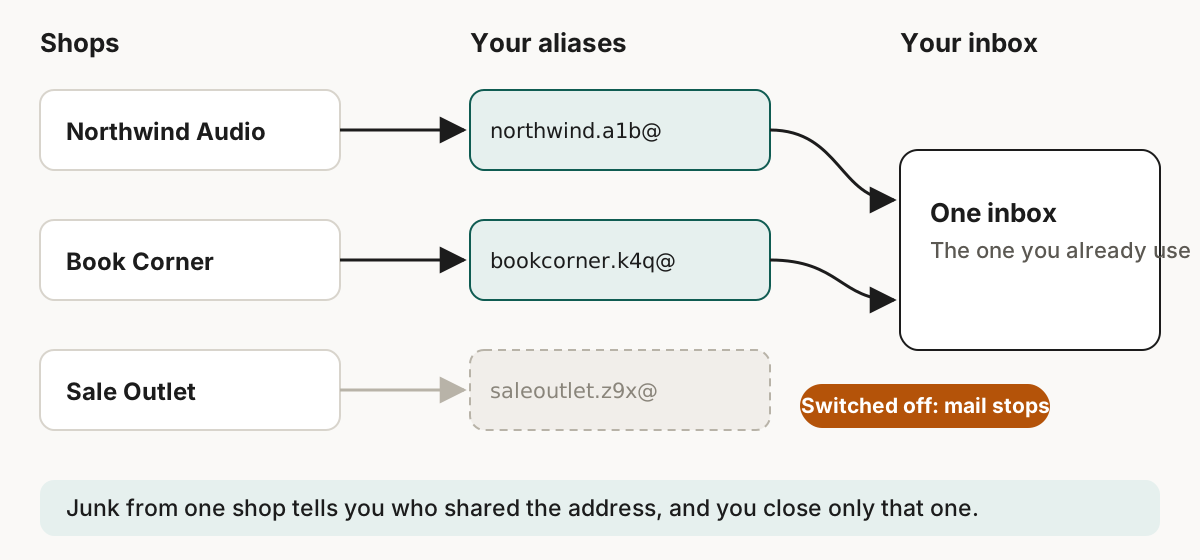
- Create the alias at checkout. Make it when you are about to type the address into the form.
- Name it after the shop. Skudo adds a few random characters. If you use a generated name, put the shop in the notes.
- Never reuse an alias. One address per shop is how you know who leaked it.
The shop still has your name and delivery address, because it needs them to send the parcel.
When something happens
| Situation | What to do |
|---|---|
| A stranger writes to the alias | The shop sold the address or it leaked. Switch the alias off. |
| Only the shop's own newsletter | Use the unsubscribe link first. |
| The shop is breached | The exposed address is one you made for that shop. Switch it off and change the password if you reused it. |
| Support wants to talk | Reply from the alias, see how to reply from an email alias. |
Have I Been Pwned lets you search an address against known breaches and sign up for alerts.[2][3] More on what a breach does is in what happens to your address when a shop is breached.
Returns and warranties
Keep the alias while the shop still owes you something
A return, a warranty claim or a tax receipt often needs the address on the order. Keep the alias alive while a return window is open, while a warranty runs, or while you might need the invoice.
For a long warranty, think about where the address lives. Addresses on Skudo's shared domains stop working if you close the account. Addresses on a domain you own stay yours.
Trackers in shop emails
Shop emails often contain a hidden image that tells the sender when you opened them. Skudo removes these and tracking link parameters by default. Gmail's help page says the same from the reader's side: "Sometimes, senders may know whether you've opened an email that has an image."[1] More in what an email tracking pixel is.
Limits
| Limit | Value |
|---|---|
| New aliases a month, each shared domain | 30 |
| New aliases a month, your personal subdomain | 75 |
| Total aliases in the first 30 days | 30 |
The limits stop abuse of the shared domains. For ordinary shopping they should not get in the way.
Sources
- Gmail Help, Turn images on or off in Gmail. https://support.google.com/mail/answer/145919. Checked on 19 September 2026. ↑
- Have I Been Pwned, Frequently Asked Questions. https://haveibeenpwned.com/FAQs. Checked on 19 September 2026. ↑
- Have I Been Pwned, Get Free Breach Notifications. https://haveibeenpwned.com/NotifyMe. Checked on 19 September 2026. ↑