How to reply from an email alias, step by step
BlogGuide
You reply to a message that arrived through an alias the way you reply to any other: you press reply in your normal mail app. The reply goes out with the alias as sender, and your real address stays out of the headers.
In short
- Press reply in your usual mail app, from the inbox the message was forwarded to.
- The other person sees only the alias. They still read everything you write.
- Replies work from day one. Writing first unlocks when the account is 30 days old.
- An alias keeps your address from the person you write to. It does not make you anonymous.
What happens when you reply
Say you sold a bike and used bike@skudo.me as the contact address. If a reply left from your real address, the alias would have done nothing. So the relay sits in the middle, in both directions.
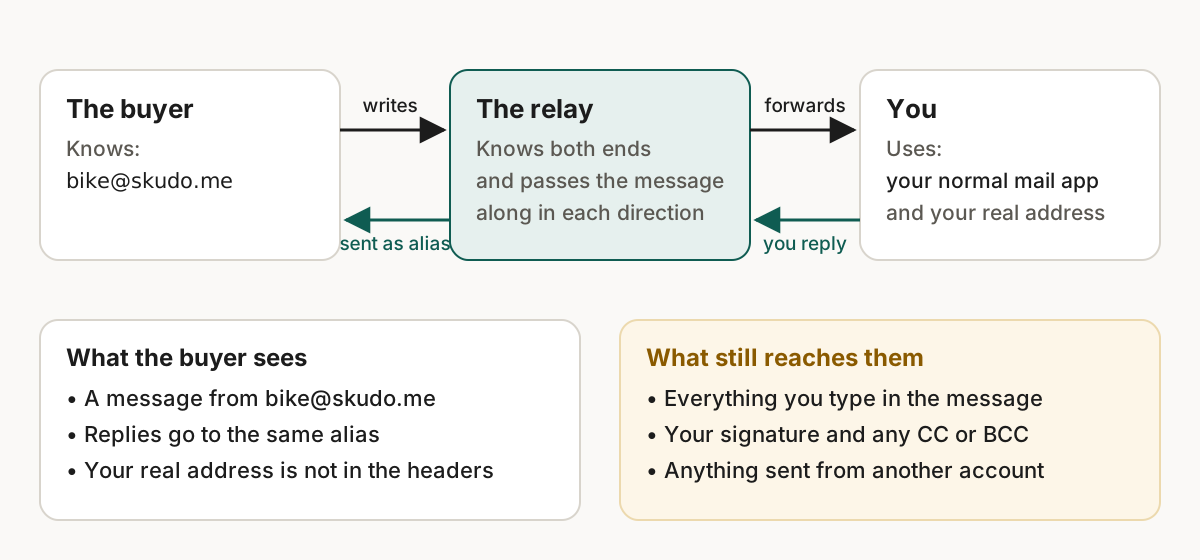
- The buyer writes to the alias. The relay looks up where it forwards to and delivers the message to your inbox.
- You press reply in your mail app. Use the inbox the message was forwarded to. The reply goes to the relay, not to the buyer.
- The relay sends it on as the alias. The buyer answers the alias again.
A message has a From field and optionally a Reply-To field. Without Reply-To, replies go to From (RFC 5322).[1] A forwarding service controls what your mail app sees there, so "reply" can land on the relay.
What the other person sees
| They see | They do not see |
|---|---|
A message from bike@skudo.me | Your real address in the headers |
| Replies going to the same alias | Which inbox you read it in |
| Everything you type, including your signature |
In the full headers, every server adds a Received line (RFC 5321).[2] In a reply sent through Skudo, your real address is not among them.
Mistakes that expose you anyway
| Mistake | What to do |
|---|---|
| A signature with your full name and phone number | Check the default signature before the first reply |
| Answering from a new message in your normal account | Reply to the thread, or write from the alias |
| Adding your real address to CC or BCC | Keep a copy in your own inbox instead |
What an alias cannot hide
- Traffic analysis at either end.
- Your mailbox provider, which reads what arrives and what you send.
- Skudo itself. The forwarding address is decrypted at each delivery, so a valid legal order could make Skudo produce it.
- Coercion aimed at you.
An alias is not anonymity
It keeps your address away from the person you write to. The full list is on the architecture page.
Start a new message
Writing first from an alias unlocks when your account is 30 days old. You send from a verified recipient address to a special address Skudo gives you for the alias. The exact steps are in the help centre at help.skudo.org. For why one alias per site helps, see email aliases for online shopping.
Sources
- IETF, RFC 5322, Internet Message Format, section 3.6.2 Originator Fields. https://www.rfc-editor.org/rfc/rfc5322.html. Checked on 19 September 2026. ↑
- IETF, RFC 5321, Simple Mail Transfer Protocol, section 4.4 Trace Information. https://www.rfc-editor.org/rfc/rfc5321.html. Checked on 19 September 2026. ↑